Blade Coater
The Blade Coater page provides manual control of the motorized coating head used to move the blade across the substrate.
The coater can be moved manually, homed to its reference position, or commanded to travel a defined distance at a defined speed. A dedicated ramp mode is also available for processes requiring a progressive increase in coating speed.
The blade height above the substrate is adjusted manually on the coating head using the mechanical adjustment knobs (see details here). The software controls only the horizontal movement of the coater.
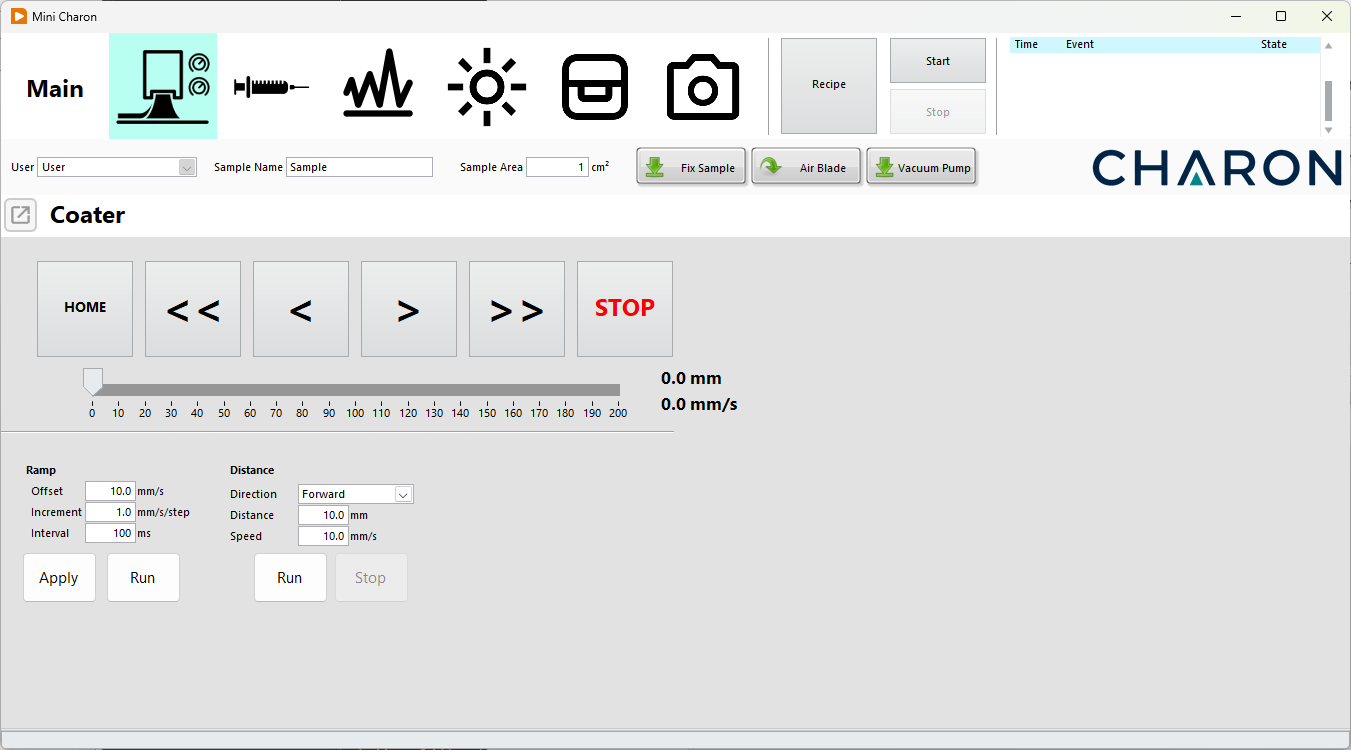
Blade Coater Overview
The Blade Coater interface is divided into four main areas:
- Manual movement controls
- Position and speed monitoring
- Speed ramp control
- Controlled-distance movement
The coater includes physical end switches at both ends of its travel. These limits are handled directly by the motor controller and prevent the user from moving the coater beyond the available mechanical range.
Maximum travel
A travel range of approximately 200 mm is shown in the example interface. The actual maximum travel depends on the Charon stage and coater configuration.
Homing the Coater
Before performing a deposition, the coater should normally be moved to its reference position.
Press HOME to start the homing procedure.
The coater moves toward the home end switch. When the physical switch is reached, the motor controller stops the movement and establishes this position as:
0 mm
The home position therefore provides the reference from which the coater position is measured.
Tip
Homing the coater before starting a new deposition procedure ensures that all subsequent positions and relative movements use a known reference.
Slot die positioning
The slot die is not fixed to the coater, so after moving backwards, the slot die should be place back manually
Manual Movement
The large movement buttons can be used to manually position the coater.
| Control | Function |
|---|---|
| HOME | Move the coater to the 0 mm home position |
| << | Move backward at the configured fast speed |
| < | Move backward at the configured slow speed |
| > | Move forward at the configured slow speed |
| >> | Move forward at the configured fast speed |
| STOP | Immediately stop the current coater movement |
The slow and fast manual movement velocities can be configured according to the system requirements.
Manual positioning is useful when:
- preparing a new deposition,
- positioning the blade relative to the substrate,
- checking the available travel,
- returning the coater to a convenient loading position,
- developing or testing a deposition procedure.
Forward and Backward Direction
In this manual:
- Forward refers to movement away from the home position.
- Backward refers to movement toward the home position.
Position and Speed Indicators
The Blade Coater page continuously displays the current motor state.
Two numerical indicators are shown:
- Position (mm) — current coater position relative to the home position.
- Speed (mm/s) — current coater velocity.
A horizontal position indicator also provides a graphical representation of the current position along the available travel.
For example:
Position: 32.8 mm
Speed:    10.0 mm/s
When the coater is stationary, the displayed speed is:
0.0 mm/s
Mechanical Travel Limits
The coater is protected by physical end switches installed at both ends of the mechanical travel.
The home end switch defines the:
0 mm position
The opposite end switch defines the maximum available travel for the installed stage.
The end switches are monitored directly by the hardware motor controller. When an end switch is reached, the motor automatically stops.
Hardware protection
Travel limits are enforced by the coater motor controller rather than by the Charon software alone. The motor therefore cannot be commanded beyond the physical end switches during normal operation.
Controlled-Distance Movement
The Distance section allows the coater to perform a defined relative movement.
The user can configure:
| Parameter | Description |
|---|---|
| Direction | Selects Forward or Backward movement |
| Distance | Defines the required travel distance in mm |
| Speed | Defines the movement velocity in mm/s |
Press Run to start the movement.
Press Stop to interrupt it before the requested distance has been completed.
Relative Movement
Distance commands are relative to the current coater position.
For example, if the coater is currently at:
40 mm
and the following parameters are entered:
Direction: Forward
Distance:  50 mm
Speed:     10 mm/s
the requested final position is:
90 mm
Similarly, a 20 mm backward movement from 90 mm results in a requested position of:
70 mm
If the requested movement reaches the physical end of the coater travel, the hardware end switch stops the motor.
Speed Ramp
The Ramp section is used when the coater must progressively increase its movement speed during travel.
Instead of moving at a constant velocity, the coater begins at an initial speed and periodically increases its velocity until the end of the available travel is reached.
Three parameters define the ramp:
Offset defines the starting velocity of the coater.
Example:
Offset: 10.0 mm/s
The ramp therefore starts with a coater velocity of 10 mm/s.
Increment defines how much the speed increases during each acceleration step.
Example:
Increment: 1.0 mm/s/step
The velocity sequence would therefore begin as:
10 mm/s
11 mm/s
12 mm/s
13 mm/s
...
Interval defines the time between two successive speed increments.
Example:
Interval: 100 ms
With:
Offset:    10 mm/s
Increment: 1 mm/s/step
Interval:  100 ms
the coater begins at 10 mm/s and increases its speed by 1 mm/s every 100 ms.
Running a Ramp
Press: Apply to upload the settings to the coater. Then press Run to start the configured ramp.
The coater:
- Starts moving at the configured Offset speed.
- Waits for the configured Interval.
- Increases the speed by the configured Increment.
- Continues increasing the velocity at each interval.
- Continues travelling toward the end of the available stage.
The hardware end switch stops the coater when the end of the mechanical travel is reached.
Press STOP if the movement must be interrupted manually.
Example Ramp
For:
Offset:    10.0 mm/s
Increment: 1.0 mm/s/step
Interval:  100 ms
Example Ramp
The graph below shows how the coater velocity changes according to the selected ramp parameters. Adjust the values to visualize different ramp configurations. The preview shows the first 10 speed increments. During an actual ramp, the coater continues increasing its speed according to these parameters until the end of the available travel is reached.
Blade Height Adjustment
The vertical blade position is not motorized by the Charon software.
Blade height and coating gap must be adjusted manually using the mechanical adjustment knobs installed on the coating head.
The required blade gap depends on factors including:
- substrate thickness,
- desired wet-film thickness,
- deposition solution,
- coating velocity,
- solution viscosity,
- process requirements.
Warning
Always verify the blade height before starting horizontal movement. An incorrectly positioned blade may contact the substrate or stage during movement.
Typical Manual Procedure
A typical manual setup procedure is:
- Place the substrate on the Charon stage.
- Activate the substrate vacuum fixation.
- Adjust the blade height manually using the mechanical adjustment knobs.
- Open the Blade Coater page.
- Press HOME to establish the 0 mm reference.
- Use the manual movement controls to position the blade.
- Verify the blade position and coating gap.
- Configure the required movement distance and speed.
- Prepare the syringe and deposition solution.
- Start the required movement or deposition procedure.
- Monitor coater position and velocity during the process.
- Use STOP if the movement must be interrupted.
For repeatable processes, these operations can instead be incorporated into a Charon Recipe.