Main Interface
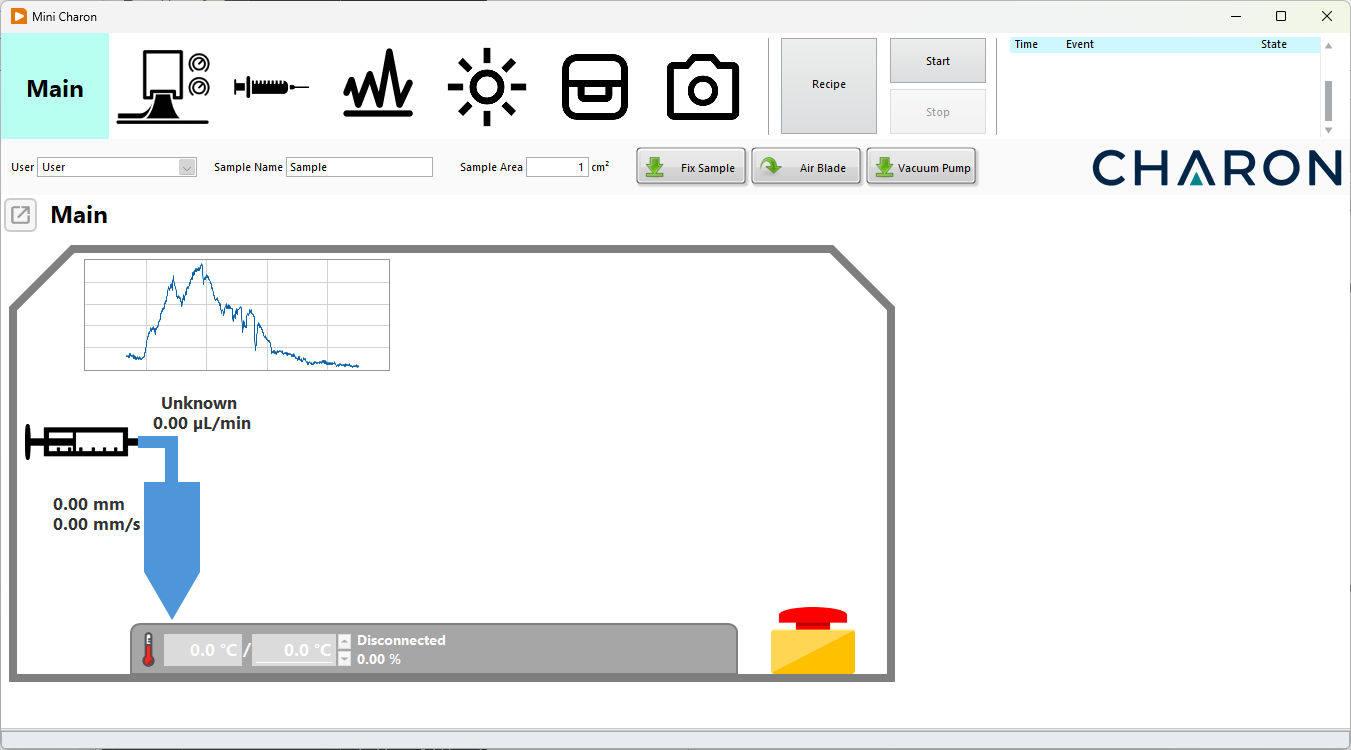
Main Window
The Main window provides an overview of the complete Charon system and is intended primarily for real-time monitoring during operation.
From this page, the user can monitor information such as:
- Syringe pump status and dispensing rate
- Blade-coater position and velocity
- Substrate temperature
- Vacuum-stage status
- Spectrometer data, when installed
- Current recipe execution
- System events and execution status
Several frequently used functions, including substrate fixation, air blade, and vacuum pump control, are also directly accessible from the upper part of the interface.
Emergency Stop
The Main window includes a STOP control for immediately interrupting an active process.
When activated, the software stops the critical operations associated with the deposition process, including:
- Coater movement
- Liquid dispensing
- Temperature control
Emergency stop
Use the STOP control whenever the deposition process must be interrupted immediately. Before restarting the system, verify the condition of the substrate, coating head, syringe pump, and heated stage.
Manual and Automated Operation
Charon can be operated in two different ways.
Manual control
Each hardware component has a dedicated software page where its parameters can be configured and the component can be operated directly.
Manual control is particularly useful for:
- System setup
- Loading and positioning substrates
- Preparing the syringe
- Adjusting coating parameters
- Testing individual components
- Developing a new deposition process
Recipe control
For repeatable deposition processes, Charon provides a programmable Recipe system.
Recipes allow individual operations to be arranged sequentially, for example:
- Home the blade coater
- Set the substrate temperature
- Wait for temperature stabilization
- Start liquid dispensing
- Move the blade over the substrate
- Wait for movement to finish
- Activate drying or additional process steps
- Return the coater to its home position
Recipes can be created, edited, saved, and loaded from the Recipe window.
Recipe files are stored as human-readable JSON text files, allowing processes to be archived, transferred between systems, and reproduced at a later time.
Typical Deposition Workflow
A typical Charon deposition consists of the following steps:
- Place the substrate on the heated stage.
- Activate the vacuum fixation.
- Set the required substrate temperature.
- Install and prepare the syringe containing the deposition solution.
- Position the blade coater.
- Configure the syringe flow rate and coating speed.
- Configure optional monitoring devices.
- Start the deposition manually or execute a predefined recipe.
- Monitor the process from the Main window.
- Stop the process and remove the substrate when the deposition is complete.
Note
The exact procedure depends on the coating material, substrate, installed accessories, and deposition recipe.