Vacuum Stage
The Vacuum Stage is used after deposition for controlled thermal treatment under vacuum.
After the film has been deposited, the substrate is manually transferred from the blade-coating stage to the vacuum chamber and placed on the heated bed. The chamber lid is then closed manually and the vacuum process is controlled through Charon.
The software controls the vacuum pump and vent valve while monitoring the chamber pressure and hotbed temperature.
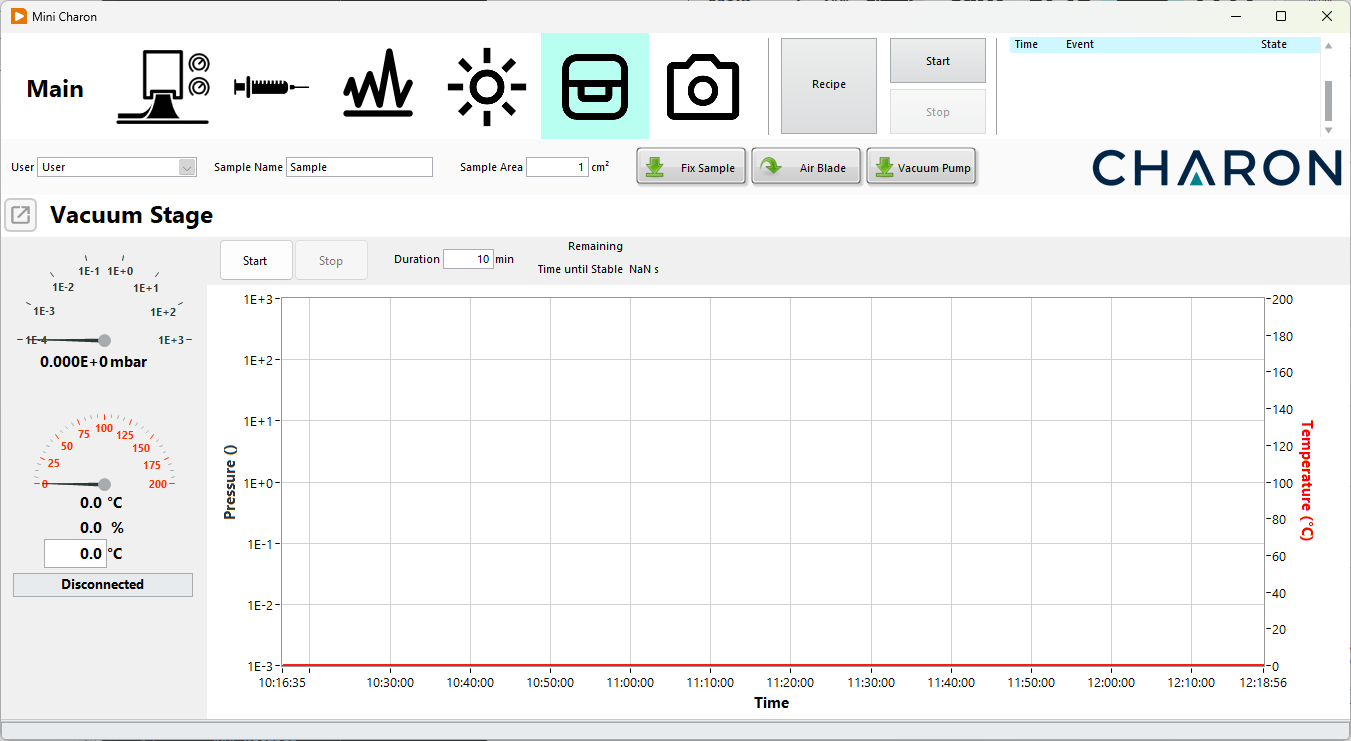
Vacuum Stage Overview
The Vacuum Stage provides:
- Hotbed temperature control
- Vacuum pump control
- Chamber pressure monitoring
- Automatic stable-vacuum detection
- Configurable total vacuum time
- Automatic pump shutdown
- Automatic chamber venting
- Vacuum-process data recording
The hotbed can be operated independently from the vacuum system.
Typical Vacuum Treatment
A typical vacuum treatment procedure is:
- Configure the required hotbed temperature.
- Configure the total vacuum time.
- Complete the film deposition.
- Manually transfer the substrate to the vacuum chamber.
- Place the substrate on the heated bed.
- Close the chamber lid.
- Press Start to begin the vacuum process.
- Charon starts the vacuum pump and monitors the chamber pressure.
- Wait until Charon detects a stable vacuum.
- The process continues until the configured vacuum time has elapsed.
- Charon automatically stops the vacuum pump and releases the vacuum.
- Wait until the chamber pressure has returned to ambient before opening the lid.
Warning
The chamber lid is closed manually and is not checked by a software interlock. Always verify that the lid is correctly closed before starting the vacuum pump.
Temperature Control
The substrate is placed on a heated bed inside the vacuum chamber. The operating range is approximately Ambient temperature – 200 °C. The user can configure the required temperature directly from the Vacuum Stage panel.
Charon displays both:
- Set temperature
- Measured hotbed temperature
Temperature control operates independently from the vacuum process. The hotbed can therefore be heated before, during, or independently of vacuum operation.
Vacuum Control
Press Start to begin a controlled vacuum process.
Charon:
- Enables the vacuum pump.
- Controls the vacuum valve.
- Monitors the chamber pressure.
- Monitors the hotbed temperature.
- Starts the vacuum timer.
- Records the process data.
The chamber pressure is measured using a Sens4 VPM-5 vacuum gauge.
Note
Live pressure and temperature values can be monitored without starting a process, but data recording begins only when Start is pressed.
Stable Vacuum
After the pump is started, Charon automatically determines when the chamber pressure has stabilized. Vacuum is considered stable when the difference between consecutive pressure measurements is less than 1%. Once this condition is reached, Charon displays the time required to reach stable vacuum.
Vacuum Time
The user can configure the total duration of the vacuum treatment. The vacuum timer starts when the vacuum pump is started, not when stable vacuum is reached.
For example, if:
Total Vacuum Time: 5 min
Stable Vacuum:     reached after 10 seconds
the total process still ends 5 minutes after the pump was initially started.
When the configured vacuum time is reached, Charon automatically:
- Stops the vacuum pump.
- Opens the controlled vent valve.
- Releases the chamber vacuum.
Manual Stop
The vacuum process can be interrupted at any time using Stop.
Pressing Stop:
- Stops the vacuum pump
- Opens the vent valve
- Releases the chamber vacuum
Warning
Do not open the vacuum chamber immediately after pressing Stop. Wait until the displayed chamber pressure has returned to approximately ambient pressure.
Data Recording
Pressure and temperature can be monitored continuously from the Vacuum Stage page. Process data are saved only when a vacuum treatment is started using Start. Simply opening the Vacuum Stage page and observing the live values does not create a recorded vacuum process. This ensures that saved data correspond to an intentionally started treatment.
The saved file contains:
Time: date and time of the measurement Pressure (mbar): measured chamber pressure Temperature (°C): measured hotbed temperature
Values are recorded once per second.
Example Data File
An example recorded vacuum process is shown below:
Time                    Pressure (mbar)     Temperature (°C)
26/08/2026 10:26:39     1.013E+3            159.6
26/08/2026 10:26:40     3.125E+1            159.9
26/08/2026 10:26:41     4.115E+0            159.7
26/08/2026 10:26:42     9.766E-1            160.3
26/08/2026 10:26:43     3.200E-1            160.0
26/08/2026 10:26:44     1.286E-1            160.0
26/08/2026 10:26:45     5.950E-2            160.2
26/08/2026 10:26:46     3.052E-2            159.6
26/08/2026 10:26:47     1.694E-2            160.1
26/08/2026 10:26:48     1.000E-2            159.8
26/08/2026 10:26:49     6.209E-3            159.6
26/08/2026 10:26:50     4.019E-3            160.0
26/08/2026 10:26:51     2.693E-3            159.8
26/08/2026 10:26:52     1.859E-3            159.6
26/08/2026 10:26:53     1.317E-3            159.7