Recipe Creation
The Recipe editor is used to create fully automated Charon deposition processes.
A recipe is built as a sequence of individual operations. Any operation that can be controlled manually from the Charon software can also be added to a recipe, allowing movement, dispensing, temperature control, accessories, and monitoring operations to be coordinated automatically.
Users can add as many steps as required and arrange them in the exact order needed for the process.
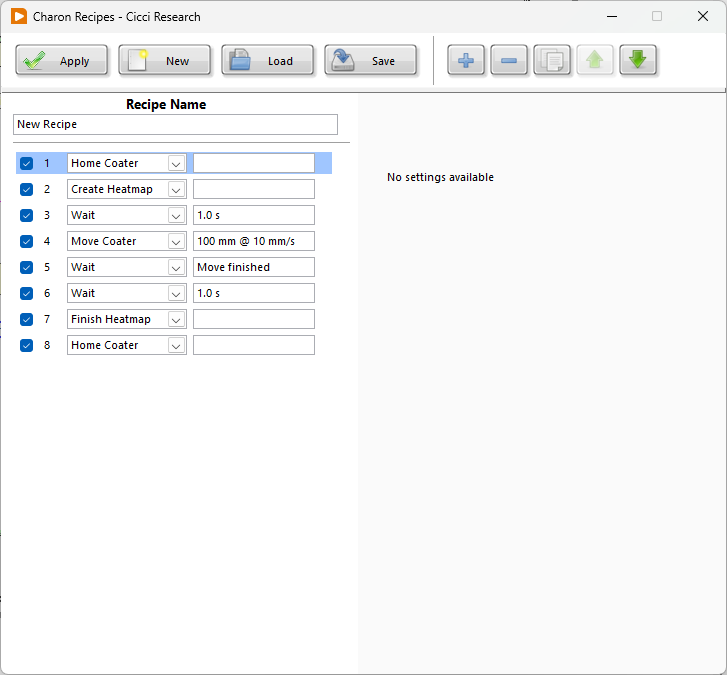
Creating a Recipe
To create a new recipe:
- Press New.
- Enter a Recipe Name.
- Add the required steps using the + button.
- Select the operation for each step.
- Configure the settings shown on the right side of the window.
- Repeat until the complete deposition sequence has been defined.
- Reorder, duplicate, disable, or remove steps if required.
- Press Save to store the recipe.
Saved recipes can later be reopened using Load.
The Apply button confirms the current recipe configuration in the Charon software.
Recipe Steps
Each row represents one operation in the recipe.
The checkbox beside the step determines whether the operation is enabled. This allows a step to be temporarily excluded without deleting it.
The toolbar can be used to:
- Add a new step
- Remove the selected step
- Duplicate a step
- Move a step up
- Move a step down
Selecting a step displays its configuration parameters on the right side of the editor.
For example, a Move Coater step allows the user to configure:
- Direction
- Distance
- Speed
The configured values are also summarized directly in the recipe list.
Available Operations
The available operations are grouped according to the Charon subsystem they control.
| Category | Operation | Function |
|---|---|---|
| Misc. | Wait | Pauses the recipe for a defined time or until the selected condition is complete |
| Coater | Move Coater | Moves the coater using the configured direction, distance, and speed |
| Home Coater | Returns the coater to its home position | |
| Stop Coater | Stops coater movement | |
| Temperature | Set Temperature | Sets the required stage temperature |
| Wait for Stable | Pauses the recipe until the temperature is considered stable | |
| Deposition | Start Deposition | Starts the syringe-pump deposition using the configured volume, flow rate, and direction |
| Stop Deposition | Stops the deposition | |
| Spectrometer | Create Heatmap | Starts a spectrometer heatmap acquisition sequence |
| Finish Heatmap | Completes the active heatmap acquisition | |
| Accessories | Set Air Blade | Configures the air blade according to the selected settings |
| Set Vacuum Stage | Configures the vacuum stage according to the selected settings | |
| Set Light | Configures the installed light source according to the selected settings |
Installed hardware
The operations available in a recipe depend on the hardware installed on the Charon system.
Wait Operations
Wait steps are used to control the timing of the sequence.
A wait can be configured for a fixed duration, for example:
Wait: 1.0 s
or for an operation to complete:
Wait: Move finished
This makes it possible to start an operation and then explicitly define when the recipe is allowed to continue.
Temperature stabilization is handled separately using Wait for Stable.
Example Recipe
The example below performs a complete automated coating sequence:
| Step | Operation | Configuration |
|---|---|---|
| 1 | Home Coater | — |
| 2 | Create Heatmap | Step size: 5; Movement: 100 |
| 3 | Wait | 1.0 s |
| 4 | Start Deposition | 1000 µL at 1 mL/min, Infuse |
| 5 | Move Coater | Forward, 100 mm at 10 mm/s |
| 6 | Wait | Move finished |
| 7 | Stop Deposition | — |
| 8 | Wait | 1.0 s |
| 9 | Finish Heatmap | — |
| 10 | Home Coater | — |
The sequence starts with the coater in a known position, begins optical monitoring and liquid deposition, performs the coating movement, waits for the movement to finish, stops dispensing, completes the heatmap, and finally returns the coater home.
Building Deposition Processes
Recipes can combine Charon operations in any order required by the experiment.
For example, a recipe can:
- set the substrate temperature,
- wait for temperature stabilization,
- enable the vacuum stage,
- position the coater,
- start solution dispensing,
- move the blade,
- wait for the movement to finish,
- stop dispensing,
- control the air blade or light source,
- acquire spectrometer data,
- introduce controlled waiting periods,
- return the system to its initial state.
This allows complete deposition processes to be reproduced without manually timing each individual operation.
Tip
Add explicit Wait steps whenever the next operation must not begin until a previous asynchronous operation has finished.