Quick Setup
Quick Setup creates a deposition recipe from the required wet or dry film thickness. Charon automatically calculates the corresponding component settings and generates the recipe steps, including any enabled imaging options.
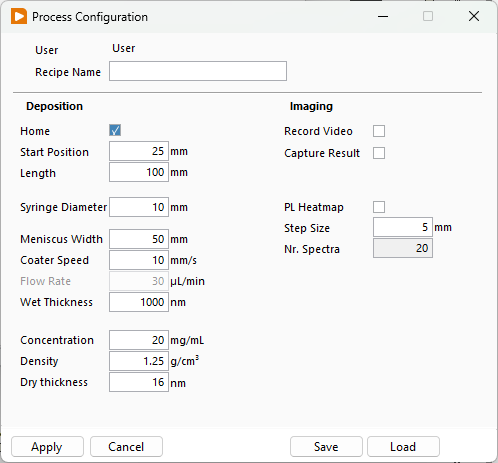
Deposition settings
Enter a Recipe Name and configure the deposition parameters:
| Setting | Description |
|---|---|
| Home | Include homing in the generated sequence. |
| Start Position | Position at which deposition begins, in mm. |
| Length | Distance travelled during deposition, in mm. |
| Syringe Diameter | Internal diameter of the syringe, in mm, used to calculate pump operation. |
| Meniscus Width | Width of the deposited wet film, in mm. |
| Coater Speed | Movement speed during deposition, in mm/s. |
| Wet Thickness | Target thickness before solvent evaporation, in nm. |
| Concentration | Mass of dissolved solids per volume of solution, in mg/mL, used for the dry thickness estimate. |
| Density | Density of the dry film material, in g/cm³, used for the dry thickness estimate. |
| Dry thickness | Estimated thickness after solvent removal, in nm. |
Specify the required Wet Thickness or Dry thickness. For a dry thickness target, also enter the solution concentration and dry material density. Charon calculates the corresponding wet thickness and required Flow Rate from the meniscus width and coater speed.
Dry thickness
The dry thickness is an estimate based on the entered material properties and assumes that the dissolved solids remain in the film after drying. The actual deposited thickness may differ.
Imaging options
Enable the acquisitions required for the recipe:
| Option | Description |
|---|---|
| Record Video | Record video during deposition. |
| Capture Result | Save an image after deposition. |
| PL Heatmap | Acquire a photoluminescence heatmap during deposition. Configure Step Size in mm and Nr. Spectra for the acquisition. |
Only enabled options are included in the generated recipe. For example, disabling Record Video omits both Start Video and Stop Video.
Generated recipe
Select Apply to generate the recipe using the configured settings. With all options enabled, the sequence is:
| Step | Action |
|---|---|
| 1 | Home |
| 2 | Wait Until Done |
| 3 | Set Start |
| 4 | Wait Until Done |
| 5 | Start Heatmap |
| 6 | Start Video |
| 7 | Start Flow |
| 8 | Start Movement |
| 9 | Wait Until Done |
| 10 | Stop Movement |
| 11 | Stop Flow |
| 12 | Stop Video |
| 13 | Stop Heatmap |
| 14 | Save Image |
| 15 | Home |
Steps issue their commands immediately; they do not wait for the physical operation to finish. A Wait Until Done step pauses the recipe before proceeding. The first two waits allow homing and positioning to finish. The wait after Start Movement allows the deposition movement to finish while flow and the enabled acquisitions remain active.
Use Save and Load to reuse a Quick Setup configuration.